Why AI Applications Need More Than a Good Model
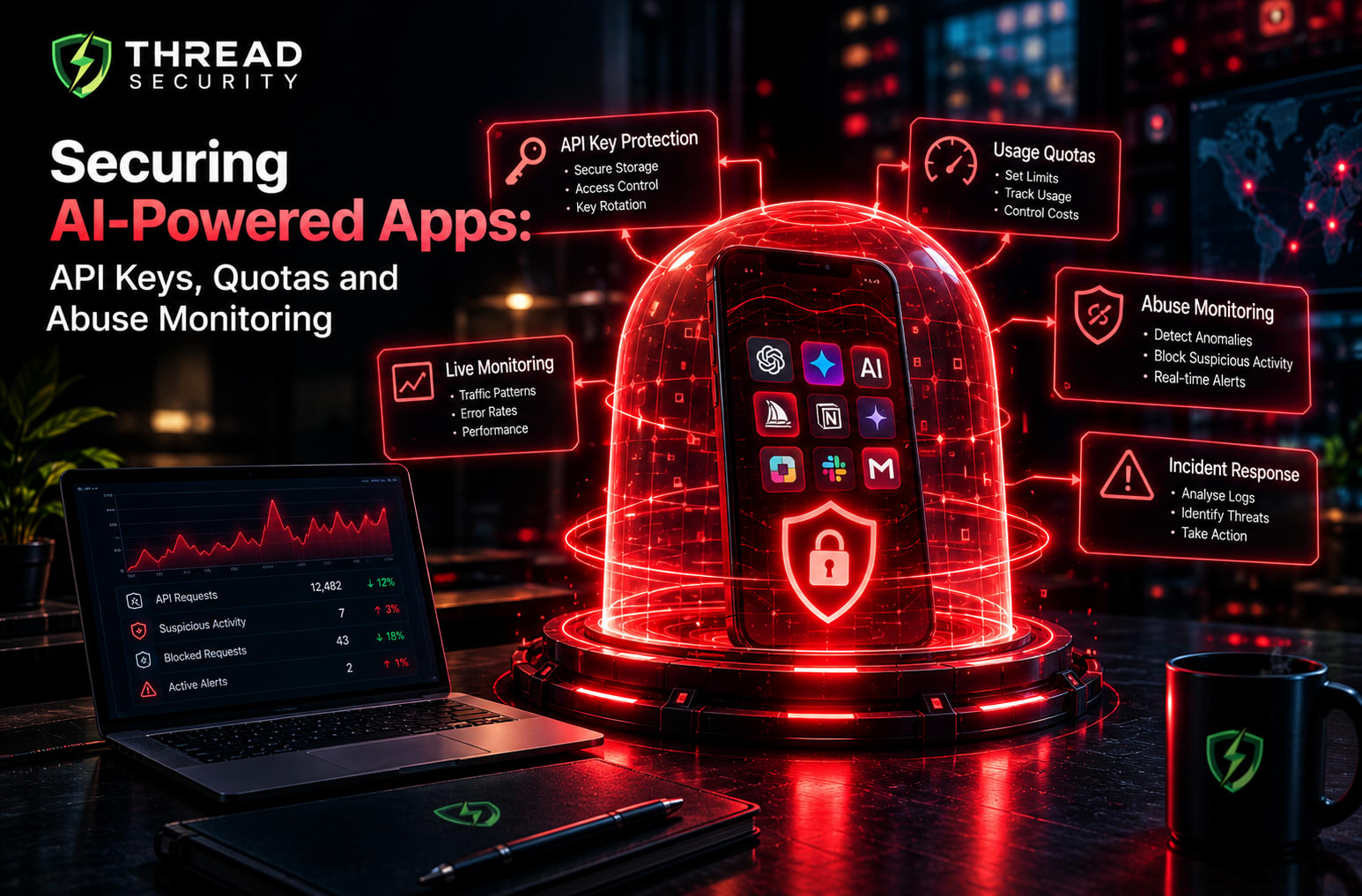
Secure AI apps require more than useful features and a polished interface. They need strong protection for API keys, controlled usage quotas, continuous abuse monitoring and reliable access controls. As businesses integrate artificial intelligence into mobile apps, web platforms and AI-powered services, attackers may attempt to steal API keys, exploit exposed endpoints, automate excessive requests or misuse application resources.
Securing AI-powered applications requires a practical combination of authentication, rate limiting, usage monitoring and incident response. These controls help developers protect sensitive credentials, manage operational costs and identify suspicious activity before it causes significant damage.
In this guide, we will explore how developers can secure AI-powered applications through API key protection, usage quotas, abuse detection and practical incident response strategies. You will learn how these security measures work, why they matter and how to apply them to build safer and more reliable AI applications.
1. Understand the Main Security Risks
AI applications introduce familiar web security risks alongside usage patterns that can be particularly expensive when each request consumes paid model resources.
Credential exposure: API keys accidentally included in public repositories, browser code, logs or shared configuration files.
Unauthorized usage: Attackers or unauthorized users using exposed credentials to access an AI provider.
Automated request abuse: Bots repeatedly submitting requests to consume model capacity or increase costs.
Quota exhaustion: Legitimate users or abusive traffic consuming request limits, token budgets or provider allocations.
Account and resource abuse: Users creating multiple accounts or exploiting weak application-level limits.
Suspicious model interactions: Repeated attempts to bypass application rules, extract restricted information or misuse connected tools.
Insufficient visibility: Missing logs and alerts that make unusual usage difficult to investigate.
These risks need different controls. Protecting a key does not prevent every abusive user, and a rate limit does not make an exposed credential safe. A strong design combines multiple independent layers.
2. Protect API Keys and Other Secrets
An API key acts as a credential that can authorize requests to an AI provider or another service. Depending on its permissions, an exposed key may allow unauthorized usage, resource consumption or access to sensitive functionality.
Never expose private keys in frontend code
Code delivered to a browser can be inspected by users. If an application embeds a private AI provider key in JavaScript, a user may be able to extract it from the downloaded files or network activity.
Instead, route requests through a trusted backend. The backend authenticates the user, checks permissions and usage limits, and calls the AI provider using a server-side credential. Return only the information the client needs.
Use environment configuration and a secrets manager
Keep credentials outside source code. For local development, use an appropriately protected environment file that is excluded from version control. In production, consider a dedicated secrets manager or the secret-management features offered by your hosting platform.
Restrict access to secrets to the services and team members that actually need them. Avoid printing full credentials in application logs, error messages, screenshots or support tickets.
Apply least privilege and rotation
Where the provider supports it, use separate credentials for development, testing and production. Limit permissions to the required resources and operations. Rotate credentials according to your organization's policy and immediately revoke or replace a key suspected of exposure.
Rotation should be planned so that dependent services can move to the replacement credential safely. After suspected exposure, investigate how the key leaked, which requests used it and whether other secrets require rotation.
3. Authenticate Users Before Spending AI Resources
A backend proxy protects provider credentials, but it should not automatically allow every visitor to use the model without restriction. The application needs its own identity and access controls.
Require authentication where appropriate, verify sessions or tokens correctly, and associate each request with a user, account or approved client identity. Enforce permissions on the server rather than trusting a user ID or account role supplied by the browser.
For public applications, additional controls may include account verification, bot protection and sensible anonymous usage limits. These measures should be proportionate to the product's risk and should not unnecessarily block legitimate users.
Also consider how the backend handles requests that take a long time, contain large documents or trigger multiple model calls. Validate file size, request length and supported formats before starting expensive processing.
4. Set Rate Limits, Quotas and Spending Budgets
Rate limits, quotas and budgets address related but different problems. Rate limits restrict how frequently requests can occur. Quotas limit cumulative usage over a defined period. Spending budgets help teams manage financial exposure.
Rate limiting
A rate limit might restrict a user to a certain number of requests per minute. When the limit is exceeded, the application can return an appropriate HTTP 429 response and, where useful, provide a Retry-After header.
Apply limits at the appropriate levels, such as per account, per API token, per IP address and across the entire service. IP-based limits alone are insufficient because multiple users can share an address and an attacker may distribute requests across many addresses.
Usage quotas
A quota can restrict requests per day, generated tokens per billing period, document-processing jobs or another meaningful measure of consumption. Different features may require different quotas because a short classification request can cost much less than a long document analysis.
Enforce limits on the backend and update usage accounting reliably. For concurrent requests, use atomic operations or suitable shared storage so that simultaneous requests cannot easily bypass the limit.
Spending budgets and provider limits
Set appropriate provider-side limits where available, alongside internal application budgets. Track usage by project, feature or customer so that teams can identify where costs originate.
Do not assume that every provider budget is a guaranteed hard spending cap. Some usage notifications are alerts rather than immediate enforcement controls. Understand the provider's specific behavior and implement application-side safeguards when strict limits are required.
5. Monitor and Detect AI Abuse
Abuse monitoring helps teams recognize patterns that normal request validation may not catch. The objective is to identify meaningful anomalies without treating every unusual user as an attacker.
What should teams monitor?
Request volume: Sudden spikes in requests from an account, IP address or endpoint.
Token consumption: Unexpected growth in input or output tokens.
Cost per user or feature: Accounts generating costs far outside their normal usage pattern.
Failure rates: Repeated authentication failures, rejected requests or invalid payloads.
Quota violations: Repeated attempts to exceed usage limits.
Model interaction patterns: Repeated suspicious inputs or attempts to trigger restricted application behavior.
Infrastructure signals: Rising latency, queue growth, error rates or resource exhaustion.
Useful monitoring combines these signals with context. A sudden increase in requests might be a legitimate product launch, while a small number of unusually expensive requests could indicate a configuration problem or abuse.
6. Build Useful Logs and Alerts
Monitoring is only useful when the team can investigate what happened. Record enough structured information to connect a request to its usage, security decisions and outcome.
Depending on the application's privacy requirements, useful fields may include a request ID, timestamp, authenticated account identifier, endpoint, model name, token usage, estimated cost, response status, latency and quota decision.
Do not log API keys, passwords or full sensitive prompts by default. Where request content is required for an investigation, minimize it, redact sensitive information, restrict access and establish an appropriate retention policy.
Configure alerts for events that require action, such as unexpected spending growth, repeated authentication failures, unusual token consumption or suspected credential exposure. Set thresholds using normal traffic patterns and review them periodically to reduce alert fatigue.
Every important alert should have an owner and a response procedure. An alert that nobody reviews does not meaningfully reduce risk.
7. Respond to Suspicious Activity
When monitoring identifies potential abuse, teams should follow a defined incident response process instead of making ad hoc decisions.
Validate the signal: Check the relevant logs, account activity and usage trends.
Contain the risk: Apply temporary rate limits, suspend a suspicious account or disable an affected feature when justified.
Protect credentials: Revoke and rotate compromised keys, then check for other exposed secrets.
Review the impact: Estimate unauthorized usage, potential data exposure and service disruption.
Notify the right people: Involve security, engineering, operations and other responsible stakeholders according to policy.
Recover and verify: Restore normal service when safe and confirm that the underlying weakness has been addressed.
Improve controls: Document lessons learned and add regression tests to prevent recurrence.
Keep response actions proportionate to the evidence. A legitimate usage spike should not automatically result in a permanent account ban, while a confirmed credential leak may require immediate revocation.
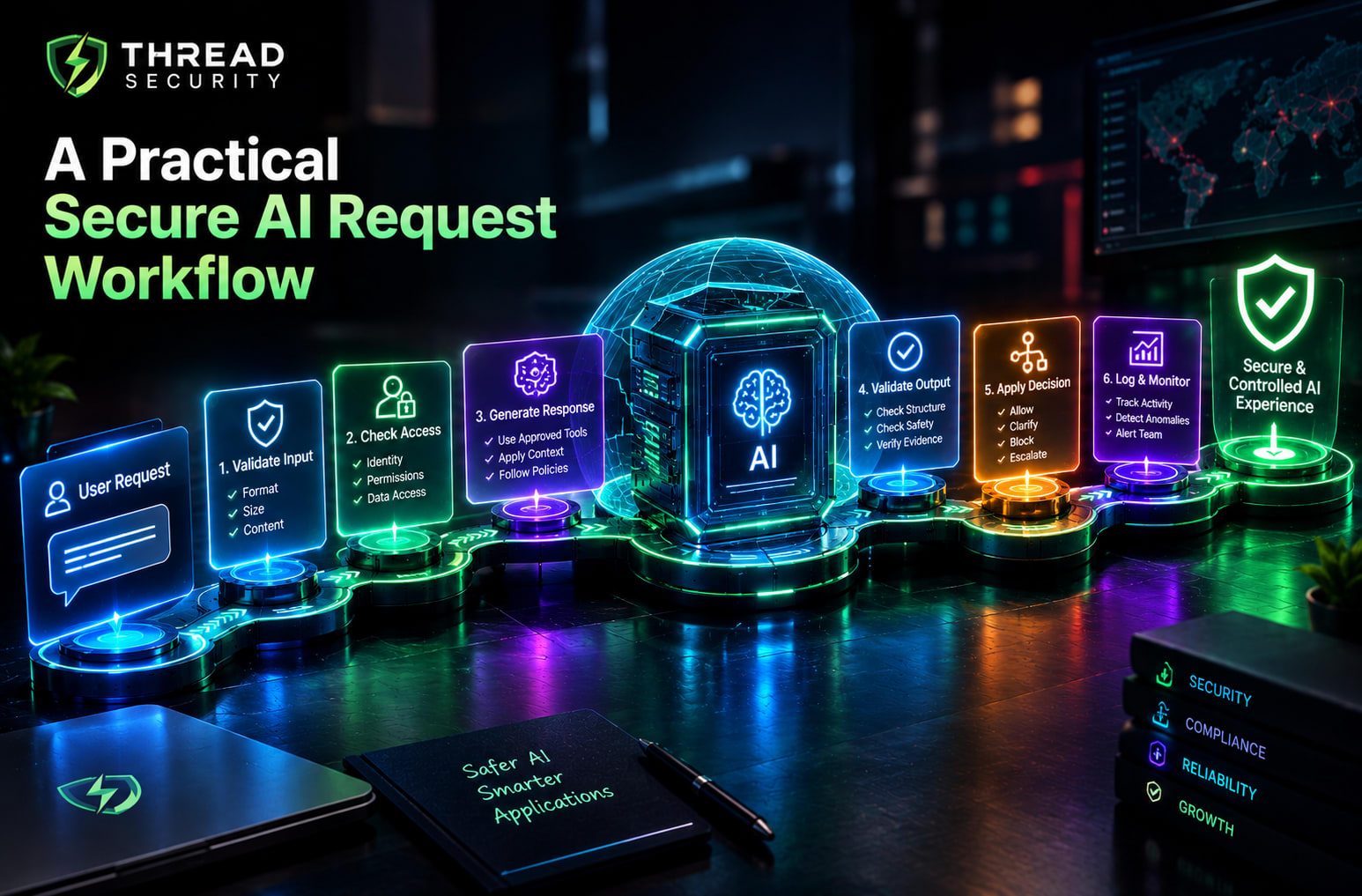
8. A Practical Secure AI Request Workflow
Imagine an AI-powered document summarization application. A secure request flow could work as follows:
The user signs in and submits a document within the permitted size limit.
The backend verifies identity, access permissions and request format.
The application checks the user's rate limit, remaining quota and applicable spending rules.
The backend calls the AI provider using a protected server-side key.
The application validates the response and applies any required output checks.
Usage, cost estimates and relevant security events are recorded without exposing secrets.
Monitoring evaluates activity for suspicious patterns and triggers alerts when needed.
If a limit is reached or suspicious activity is detected, the application applies a defined response rather than continuing without restriction.
This design does not eliminate every risk. It creates several checkpoints so that a failure in one control does not automatically expose the entire application.
9. Common Mistakes to Avoid
Putting API keys in public repositories: Scan repositories for secrets and revoke exposed credentials promptly.
Relying only on frontend limits: Users can bypass checks implemented solely in browser code.
Using one global quota for everyone: Consider account-level and feature-specific usage requirements.
Assuming provider alerts stop spending: Verify whether the configured limit actually blocks additional requests.
Ignoring expensive requests: Restrict input sizes, output lengths and unnecessary repeated model calls.
Logging everything: Collect useful diagnostic evidence while protecting private information.
Blocking users without investigation: Combine automated detection with context and an appropriate review process.
Skipping security testing: Test exposed-key scenarios, quota enforcement, concurrent requests and alert behavior in an authorized environment.
10. Beginner Security Checklist
Before launching an AI-powered application, use this checklist to review the essentials:
Keep provider API keys on the server and outside source control.
Use separate credentials for development and production where practical.
Authenticate users and enforce permissions on the backend.
Validate request formats, sizes and supported inputs.
Configure rate limits, per-user quotas and spending controls.
Understand the actual enforcement behavior of provider-side limits.
Monitor request volume, token usage, cost and suspicious activity.
Protect logs and avoid unnecessary collection of sensitive content.
Define alert ownership and incident response procedures.
Test that limits, credential revocation and alerts work as intended.
Build Your AI and Cybersecurity Skills with Thread Security Education
As AI features become part of everyday software, developers need to understand both model integration and the security practices that make these applications dependable. API security, access control, usage management and monitoring are valuable skills for anyone building or maintaining AI-enabled products.
Thread Security Education focuses on practical, industry-oriented technical learning across artificial intelligence and cybersecurity. Learners interested in AI development, secure applications and emerging technology risks can explore structured learning and hands-on practice to strengthen their technical foundations.
Explore Thread Security to learn more about its training and technical learning opportunities.
Final Takeaway
Securing AI-powered apps means protecting the entire request lifecycle, not just the model. Keep API keys private, authenticate users, enforce rate limits and quotas, monitor consumption, detect suspicious behavior and prepare a clear response to incidents.
These controls work best together. A protected key reduces credential risk, a backend quota limits resource consumption, monitoring highlights unusual patterns and an incident response plan helps the team act quickly. With regular testing and continuous improvement, developers can make AI features safer, more predictable and more sustainable to operate.
Simranjit Kaur
VERIFIEDAI Trainer · Thread Security
Faculty mentor & research guide at Thread Security Education.