Introduction: Your First AI Hackathon Is Not About Building the Next Big AI Model
An AI hackathon for beginners can be one of the most practical ways to understand how artificial intelligence is used to solve real problems. You may know Python, have experimented with machine learning models, or have used generative AI tools, but a hackathon puts those skills into a different environment. You have limited time, a team to coordinate, a problem to solve, and a final solution to demonstrate.
Many students hesitate to participate because they assume hackathons are only for experienced programmers or people who can build complex AI systems from scratch. That assumption is incorrect. A beginner can contribute through research, problem analysis, interface design, testing, documentation, and presentation. What matters is understanding the challenge and delivering a working solution within the available time.
This guide explains how to find suitable events, choose a manageable problem, divide team responsibilities, build a useful AI-powered demo, and present your work. It also includes a practical 48-hour plan to help you approach your first competition with a clear strategy.
1. What Is an AI Hackathon?
An AI hackathon is a time-bound competition or collaborative event in which participants develop solutions using artificial intelligence or related technologies. Organizers may provide a theme, problem statement, dataset, technology requirements, or a set of challenges.
Participants work individually or in teams to develop a prototype and present their approach before the deadline. Depending on the event, judges may evaluate innovation, technical implementation, usefulness, presentation, feasibility, and potential impact.
AI hackathons can cover different areas, including:
Generative AI: Applications involving text generation, document assistance, summarization, and conversational systems.
Machine Learning: Predictive models, classification, forecasting, and recommendation systems.
Computer Vision: Image classification, object detection, visual inspection, and image analysis.
Natural Language Processing: Text analysis, information extraction, language classification, and question answering.
AI for social impact: Solutions related to education, accessibility, sustainability, public services, and community challenges.
Not every event requires participants to train a model. Some allow existing models, APIs, open-source libraries, or AI development platforms. Always read the competition rules before choosing your technical approach.
2. Where Can Beginners Find AI Hackathons?
Your first challenge may not be building a project. It may be finding a suitable competition. Instead of waiting for someone to announce an opportunity, regularly explore platforms and communities that publish hackathons and technical events.
Devpost: Explore technology competitions, project submissions, event themes, and examples of previously submitted projects.
Unstop: Find student competitions, innovation challenges, hackathons, and other opportunities.
MLH (Major League Hacking): Explore hackathon opportunities and resources for student developers.
HackerEarth: Look for technical challenges, coding competitions, and innovation events.
College and university communities: Check technical clubs, innovation cells, department announcements, and student communities.
You can also follow AI communities, developer groups, technology organizations, and event organizers on professional platforms. Some competitions are online, while others require physical attendance.
Before registering, verify the event's official website, eligibility requirements, dates, team-size rules, submission format, permitted tools, and judging criteria. Check whether the event is free or has a registration fee. Avoid sharing sensitive information with unofficial organizers.
3. Understand the Problem Before Choosing a Technology
One of the biggest beginner mistakes is starting with a favourite technology instead of understanding the actual problem. A participant may decide to build a chatbot simply because they have used one before, even when the challenge requires something entirely different.
Start by identifying four things:
Who faces the problem? Identify the intended users or stakeholders.
What is difficult for them? Understand the specific problem rather than describing a broad industry issue.
What should your solution improve? Define the expected outcome, such as reducing manual work or improving access to information.
How will you demonstrate the improvement? Decide what the judges or users should be able to see during your demo.
For example, "improve education using AI" is too broad for a short hackathon. A more focused problem could be helping students search a collection of course notes and receive answers with references to the relevant sections.
The narrower problem is easier to understand, implement, test, and explain. It also gives your team a clear definition of what a successful prototype should do.
4. Choose a Project You Can Actually Finish
In a hackathon, an ambitious idea is not automatically a strong idea. A project that promises ten features but demonstrates none of them is weaker than a smaller solution that works reliably.
Choose a problem with a clear user, manageable inputs, accessible data, and a demonstrable output. Consider the tools and skills available to your team before finalizing the idea.
Here are some project directions that beginners can adapt:
Document intelligence assistant: Allow users to upload documents and ask questions about their contents, with answers linked to relevant passages.
Accessibility assistant: Build a prototype that converts selected information into a more accessible format for a specific user need.
Visual quality checker: Use an existing computer vision model to identify selected visual defects in sample images.
Learning recommendation tool: Suggest learning resources based on a user's selected topic, current level, and learning goals.
Meeting action extractor: Convert sample meeting transcripts into summaries, decisions, and assigned action items.
Local information assistant: Organize a small, verified collection of public information and make it searchable through a conversational interface.
These are starting points, not complete project specifications. Your team should define the target user, input, expected output, limitations, and demonstration before implementation.
Also check whether your project duplicates an existing solution. You do not need to invent a completely new technology, but you should explain what your implementation improves or makes easier for its intended users.
5. Divide Team Roles Before You Start Coding
A hackathon team does not need five people writing code simultaneously. In fact, this often creates confusion, duplicated work, and integration problems. Each member should have a clear responsibility.
For a team of four, a practical division could look like this:
AI and backend developer: Handles the model, prompts, data processing, API integration, and core application logic.
Frontend developer: Builds the interface, connects application components, and makes the demo usable.
Research and problem analyst: Studies the problem, verifies requirements, identifies useful data, and checks whether the solution addresses the intended need.
Integration, testing, and presentation lead: Coordinates tasks, checks end-to-end functionality, records limitations, prepares slides, and manages the final demonstration.
These roles are flexible. In a two-person team, each member may handle multiple responsibilities. In a larger team, additional members can focus on data preparation, testing, user experience, or documentation.
One person should maintain a shared task list and monitor the deadline. Everyone should know which features are essential, who owns each task, and what happens if a component is delayed.
Do not assign the entire project to the strongest programmer while everyone else waits. Collaboration is part of the competition, and clear responsibilities make better use of the team's available time.
6. Build a Working Demo Instead of Chasing Too Many Features
The main objective during a short hackathon is to create a minimum viable prototype, often called an MVP. It should demonstrate the central idea clearly, even if it does not include every feature you eventually want to develop.
For example, suppose your team is building a document question-answering assistant. A reasonable first version might support document upload, text extraction, retrieval of relevant passages, answer generation, and a simple interface displaying the response with its source.
Do not begin by adding user accounts, complex dashboards, multiple languages, advanced analytics, mobile applications, and unrelated integrations. Those features may be useful later, but they can distract the team from proving that the core idea works.
A useful development sequence is:
Build the smallest version of the core workflow.
Test it with a few realistic examples.
Identify the most important failure or usability issue.
Fix the issue and test again.
Add only the features that directly improve the demonstration.
Use existing models and tools when the rules permit them. You can use open-source libraries, pretrained models, approved APIs, and available development platforms. However, understand the limitations, licensing conditions, usage costs, and data privacy implications of the tools you select.
A prototype should also fail gracefully. If the model cannot answer a question, show a useful message instead of displaying invented information as fact.
7. Make Your AI Solution More Reliable
Using an AI model does not automatically make a project intelligent or useful. The quality of the input data, application logic, evaluation, and user experience all influence the result.
Before the final submission, test your prototype using different examples. Check whether the output is relevant, whether the application handles unexpected inputs, and whether users can understand what the system is doing.
For a generative AI application, check for unsupported answers, incorrect summaries, prompt injection risks, and accidental exposure of sensitive information. For a machine learning model, examine appropriate evaluation metrics rather than relying on one impressive example.
Keep a record of what works and what does not. A small set of test cases with documented results is more useful than simply claiming that your application is accurate.
8. Your 48-Hour AI Hackathon Plan
A 48-hour hackathon can feel overwhelming without a schedule. The following plan is designed to keep your team focused on a working solution rather than spending most of the competition discussing ideas.
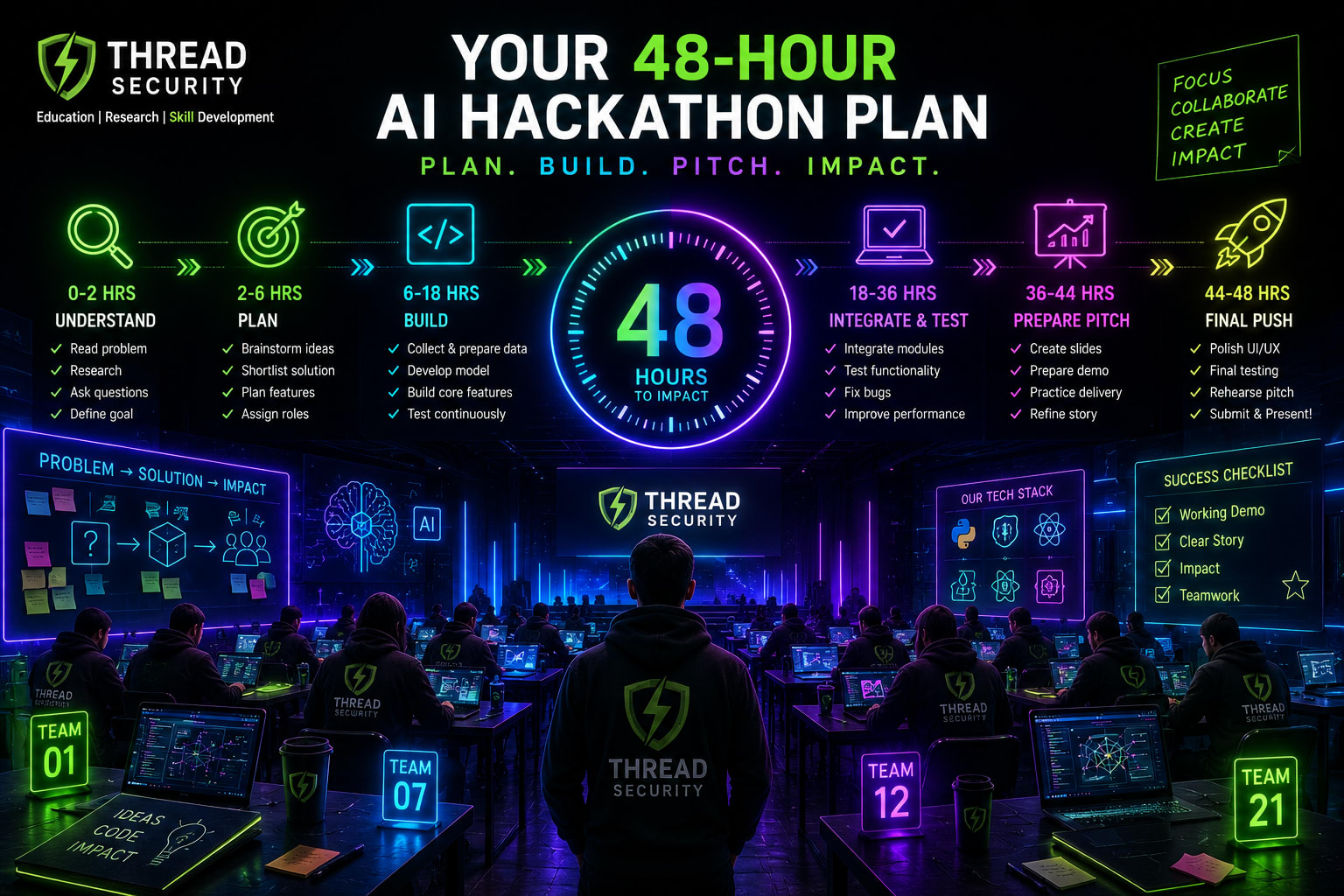
Hours 0–4: Understand and Plan
Read the problem statement and judging criteria.
Identify the target user and the specific problem.
Choose one narrow project idea.
Agree on the MVP and divide team responsibilities.
Select the tools, data, and development environment.
Expected output: A clear problem statement, feature list, team task allocation, and basic workflow.
Hours 4–12: Build the Core
Set up the repository and project structure.
Prepare sample data or connect the required data source.
Implement the main AI functionality.
Create a basic interface or interaction method.
Test the first end-to-end workflow.
Expected output: An early working prototype, even if the interface is incomplete.
Hours 12–24: Integrate and Improve
Connect the interface, backend, and model components.
Test the solution with realistic inputs.
Fix the most serious bugs.
Improve output quality and user experience.
Record limitations and any external dependencies.
Expected output: A usable MVP that demonstrates the main idea.
Hours 24–36: Validate and Prepare
Run multiple test cases.
Check application stability and error handling.
Remove incomplete features that create unnecessary risk.
Prepare screenshots and a backup demo recording.
Collect evidence of the results and document limitations.
Expected output: A tested prototype with a clear demonstration flow.
Hours 36–44: Build the Presentation
Prepare slides covering the problem, users, solution, and technology.
Explain the architecture and important implementation decisions.
Show the working demo rather than relying entirely on screenshots.
Present test results, limitations, and future improvements.
Rehearse the presentation and divide speaking responsibilities.
Expected output: A concise presentation and a rehearsed demo.
Hours 44–48: Final Checks and Submission
Verify submission instructions and deadlines.
Check the repository, documentation, and project links.
Ensure the demo works in the presentation environment.
Submit the project before the deadline.
Prepare to answer questions from judges.
Expected output: A complete submission and a ready-to-present project.
This is a planning framework, not a reason to sacrifice sleep or ignore event rules. If the organizers provide a shorter or longer schedule, adapt it. Avoid making critical code changes in the final minutes unless you have time to test them.
9. How to Present Your Project to Judges
A technically functional solution can still be difficult to evaluate if the team cannot explain it. Your presentation should make the problem, solution, implementation, and results easy to understand.
A simple presentation structure is:
The problem: What specific issue are you solving, and who experiences it?
The solution: What have you built, and how does it help the intended user?
The technology: Which models, libraries, datasets, and tools did you use?
The demonstration: Show the core workflow using a realistic example.
The results: Explain what you tested and what the results indicate.
The limitations: Be honest about what is incomplete or needs improvement.
The next steps: Explain how the solution could be developed further.
Do not claim that a prototype is production-ready if it has only been tested with a few sample inputs. Do not describe an API integration as your own trained model. Judges may ask detailed questions about your technical choices, so every team member should understand the overall project.
Keep a backup recording or screenshots in case the internet connection, API, or demonstration environment fails. A backup should support the presentation, not replace an actual working demonstration when one is required.
10. What Can You Learn from an AI Hackathon?
The value of a hackathon is not limited to winning a competition. It exposes participants to practical challenges that are often missing from isolated tutorials and classroom exercises.
Problem-solving: Learn to convert broad ideas into specific, achievable tasks.
Technical implementation: Understand how models, APIs, datasets, and interfaces work together.
Team collaboration: Practice dividing responsibilities, sharing progress, and resolving technical disagreements.
Time management: Learn to prioritize essential functionality under a deadline.
Technical communication: Explain design decisions and demonstrate results clearly.
Project documentation: Maintain repositories, write setup instructions, and record limitations.
You can also use a completed project as portfolio evidence. Add a clear description, screenshots, a demonstration video, and a repository link where permitted. Explain exactly what you contributed and what the project currently supports.
Participation does not guarantee an internship, job, certificate, or placement. However, a well-documented project can give you a concrete example to discuss during technical interviews and future applications.
11. Common Mistakes First-Time Participants Should Avoid
Choosing an oversized problem: Reduce the scope until the core feature can be demonstrated.
Starting implementation too late: Make the important technical decisions early.
Using tools without understanding them: Know what each model or service does and what its limitations are.
Ignoring the judging criteria: Build around the actual competition requirements.
Skipping testing: A successful first run is not enough evidence of reliability.
Leaving integration until the end: Connect components early so that problems appear while there is still time to fix them.
Overloading the presentation: Explain the main problem and demonstrate the central workflow clearly.
Exaggerating results: Report only the performance and capabilities you have actually verified.
Frequently Asked Questions
Can beginners participate in AI hackathons?
Yes. Many events welcome students and first-time participants. Check the eligibility requirements and choose a competition that matches your current skills. You can contribute through research, testing, documentation, design, and development.
Do I need advanced machine learning knowledge?
No. Basic Python and familiarity with AI concepts can be enough for some beginner-friendly events. You can also use pretrained models and existing tools when competition rules permit them.
What should I build in my first AI hackathon?
Choose a small project that solves a specific problem and can be demonstrated within the event duration. Document assistants, focused automation tools, accessibility prototypes, and simple prediction applications are possible starting points.
Should I participate alone or in a team?
Both options can work, depending on the event rules. A team allows members to divide technical and non-technical responsibilities, while an individual project requires you to manage the entire workflow yourself.
What should I add to my resume after a hackathon?
Mention the project, your specific contribution, technologies used, and any verified results. Add a repository or demo link when available. Do not claim awards or outcomes that you did not receive.
Final Thoughts: Build Something Small, Useful, and Demonstrable
Your first AI hackathon should be approached as a practical learning experience, not a competition to build the most complicated system. Understand the problem, select a manageable idea, divide responsibilities, and focus on delivering a working prototype.
The ability to make sensible technical decisions under time constraints is just as important as knowing how to use an AI model. A focused project with clear results and honest documentation can teach you more than an ambitious idea that never reaches a working demonstration.
At Thread Security Education, we encourage learners to move beyond theoretical knowledge through practical projects, technical exploration, and industry-oriented learning. Whether you are preparing for an AI hackathon, developing your portfolio, or exploring AI courses in Jalandhar, focus on building skills that you can demonstrate and explain.
Visit Thread Security to explore our learning resources and training opportunities. Choose a problem, bring together a team, and turn your next AI idea into a working prototype.
Simranjit Kaur
VERIFIEDAI Trainer · Thread Security
Faculty mentor & research guide at Thread Security Education.