Let's face it, it's a typical scenario. You watch a video about hackers. You get excited. You install Kali Linux, spend 40 minutes in a terminal, shut it off, and feel a little dumb.
You're not stupid. You were in the middle.
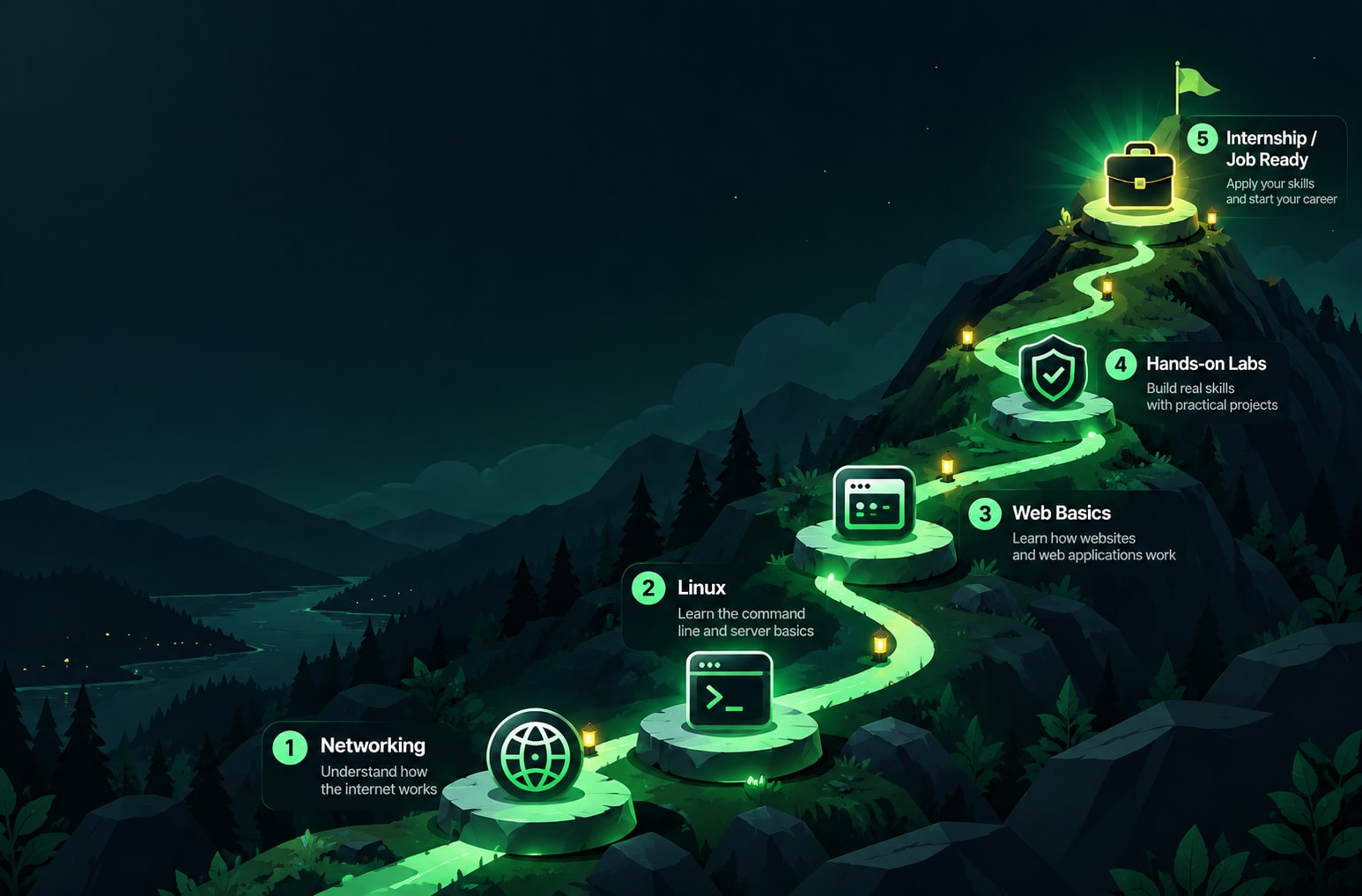
This 90-day cybersecurity roadmap gives you a structured path from the basics to practical lab work, portfolio building, and internship applications. The goal is to finish with more than a certificate: a public record of what you actually did, what you learned, and how you solved problems. That evidence can help you demonstrate your skills when applying for internships. Let's build it.
A quick reality check: What do interns do?Let's start with a quick reality check: What do interns do?
It's good to know what you're going to do first. I scanned a few of the available internship opportunities and the sequence is a delight to read.
Security operations (SOC) interns assist in monitoring alerts, review logs, and can aid those dealing with incidents. One posting from Malaysia states that prior experience is not necessary, but a good networking, security basics and understanding of SIEM is favoured. A job in the United States requires some Python/PowerShell scripting and proof of labs/competitions. Another is in Hyderabad who is looking for an intern to examine the attack surface of web applications, having a basic understanding of networking, web architecture and Windows or Linux. A Pune listing for vulnerability testing requires networking, basic knowledge of the Linux operating system and the basics of ethical hacking.
Notice what's missing. No one wants 10 tools. They want basics, curiosity and evidence of touching things. Some posts even mention interns will be given the opportunity to run their own little project; you can only practise what's mentioned!
Another helpful lens: The NICE Workforce Framework released by the U.S. standards-setting organization NIST classifies cybersecurity jobs into roles and tasks. Just a quick skim because it clearly makes the point that a job isn't a work role. The position you're heading towards next after "intern" could be a combination of several different jobs. Do not be concerned about choosing the right path at this time. Choose a direction and go.
The rules of game
Before week one, there are three rules.
Rule 1: Only touch what's yours. Practice on your own machine, on labs built for this, or on systems where you have written permission. Never "just test" a friend's site, your college portal or a random company. That's not a gray area, it's the fast way to end a career before it starts.
Rule 2: Make it small and frequent, big and rare. The hour a day, 90 times a year is more effective than a weekend binge and three weeks of remorse.
Rule 3: Make it public. Create 1 GitHub repository and 1 weekly post (LinkedIn, Medium, anywhere you're at ease). Record an experiment, what went wrong and what you learned from it. For 14 days it will feel uncomfortable, and then it will be the best thing that you have.
Weeks 1–2: How computers talk to each other.
Let's not get into hacking yet. Find out what you'll eventually be defending.
Understanding what an IP address, DNS lookup and a port truly represents
How a Browser Request gets Served: DNS, TCP, HTTP
Run the Wireshark program and observe traffic in and out of your own computer as you open up one site
Your log entry: a brief narrative that you created about what you see when you type in a URL, and one annotated screen shot of your own capture.
Week 3-4 Get comfortable in Linux
Set up a Virtual Machine of Linux. Stay in the terminal for 2 Weeks. It will be slow and it's OK.
Moving around, file permissions, users and groups
Reading logs (check who has been logging on to it – see the authentication log)
A simple bash script to count the failed logins.
Your log: the script, and a paragraph about one thing you were confused about.
Weeks 5–6: Web basics
The majority of the attacks you'll hear about are carried out on the web; know how to operate the web.
A set of web tools is comprised of requests and responses, cookies, and sessions, as well as status codes.
Sketch a login form and use the developer tools of your browser to examine it.
Before even attempting any of them, read about the OWASP Top 10 categories (in a non-technical way).
Your Log entry: “Three ways a login can go wrong and how a login works.”
Weeks 7-8: Your first safe lab.
Now the fun bit. OWASP Juice Shop is an official OWASP project: A deliberately insecure shop for training, which covers OWASP Top Ten and beyond. It is run on your own computer, typically Docker and attacked without disturbing anyone. It is clearly a project that is supposed to be insecure and not used for real data, so don't use it for anything but local and isolated.
Pick three challenges. Solve them. Avoid copying the walkthrough line-by-line, but rather attempt, get stuck, then look for a clue.
Your log statement: 1 per challenge and it will look like this: what I did, what I saw, why it worked, how a developer would fix it. That is a part of the difference between defender and tool-clicker.
Weeks 9-10: Play forwards and play like a defender.
The majority of internships are to play defense so go for two weeks at play defense.
At the diagram level understand what an alert and SIEM are.
Write a short Python program that will read a log file and print out the repeated failed logins.
Read a public incident report and record the sequence of events - first, next, last.
This is where threat security becomes a habit – for each attack that you read about, ask yourself what the earliest sign was and who might have noticed.
Your log entry: Your script and a brief comment about how you would detect the brute force attempts.
Week 11: Clean up your portfolio
Ten projects is not required. You will need to have three neat ones.
Place a clear README file on the repo!
Choose the top 3 write-ups as your best ones and edit them accordingly
Include a one-page "about me" page that includes a direction you're going (SOC, web testing, cloud, whatever is true today).
Have one of your friends read it cold. If you're unsure, neither will be a recruiter.
Week 12: Interview practice
Be sure to say the answers aloud. This is silly but it really is a great way to do it!
Practice to explain simply and within 2 minutes:
What does a URL do when you enter it into a web browser? What does a URL do when you type a URL into a Web browser?
What is the difference between a vulnerability, a threat and a risk?
A lab performed by you from your own lab book with an error.
What you'd do if you received a warning about a possible suspicious login
Interviewers look for 3 things when interviewing for internships: do you know what you are doing, can you articulate it, and will you continue to learn. The three are all answered in your log.
Week 13: Apply, review and breathe
Make multiple applications for a few jobs a week. Adapt first two lines to the job. Maintain a track of which applications you have made.
Note about quality: if a “internship” requires payment of a fee, or guarantees a job or even conceals the name of the company, exercise caution. A real internship doesn't pay you with money, it pays you with experience! If in any doubt, request the official e-mail from the company and visit the website.

What not to rush
This is a list, not a schedule.
Don't go for certificates first. They can assist at a later time. At this time they are a courteous form of practice postponement.
Don't collect tools. 10 tools you don't know about are worse than 2 you can.
Do not wait to get to the hacking; network and Linux first! All the muddled moments that follow can be traced back to a missed basic.
Avoid comparing your week 3 to other people's year 3. Highlights are online profiles.
Avoid following any single tutorial! When it really counts, double check with the official docs.
A note on this in the context of India
This plan has a lot of holes where everyone is looking for internship postings in India: networking and Linux basics, and among the various ways to get into the internships, there is VAPT (vulnerability assessment and penetration testing). There were some listings which were unpaid or short and some aggregator listings that I saw mentioned monthly stipends ranging from INR 20-25K, I could not verify how they were paid. Read terms carefully.
We often see this lack of hands-on experience in the lab again and again, students who are familiar with the terms but haven't actually been in a lab. A public log addresses just that scenario.
In what ways a course can assist (and can't)
While a course cannot work for you, it can provide you with structure, feedback and a lab that you wouldn't have to have on your own. While evaluating cyber security courses in Jalandhar, request three things: Do I get some hands-on lab time? Are my plans going to be read by somebody? Does it block the defender's sightline or just attacks?
The 90-day cybersecurity roadmap in one breath
Get acquainted with the internet. Make your way at ease in Linux. Understand the web. Smash a secure lab, and explain what to do. Create a defender's script. Tidy your log. Practise out loud. Apply.
It's the entire cybersecurity path. It isn't glamorous. It's visible, hence it works.
Start tonight. Create the GitHub repo, edit the README with the word "Day 1" and open Wireshark. Your potential employer is reading your diary. Make it yours.
Need some mentoring and homework help? Learn about the programmes of Thread Security.
Explore cyber security courses in Jalandhar: https://www.threadsecurity.in/courses
Visit Thread Security: https://www.threadsecurity.in
Akshay Kumar
VERIFIEDAcademic Coordinator · Thread Security
Faculty mentor & research guide at Thread Security Education.