Introduction: Why AI Failures Need a Response Plan
AI incident response is the process of identifying, documenting, investigating and addressing failures or harmful events involving artificial intelligence systems. An AI application may produce incorrect information, expose sensitive data, behave unfairly, fail to detect a threat or become vulnerable to manipulation. When something goes wrong, simply restarting the application or correcting one output is not enough. Organizations need to understand what happened, who was affected, what evidence should be preserved and how the same failure can be prevented.
Unlike a conventional software error, an AI failure may involve several connected factors: the model, training data, prompts, external tools, application code, user behavior and deployment environment. A chatbot might generate an inaccurate answer because of outdated information, a retrieval failure or an unsafe instruction. Without proper investigation, a team may fix the visible symptom while leaving the actual cause untouched.
This guide explains how to recognize AI incidents, what information to record, whom to notify, how to conduct a root-cause review and how to turn the findings into practical improvements. A fictional example will demonstrate the process from detection to recovery.
1. What Counts as an AI Incident?
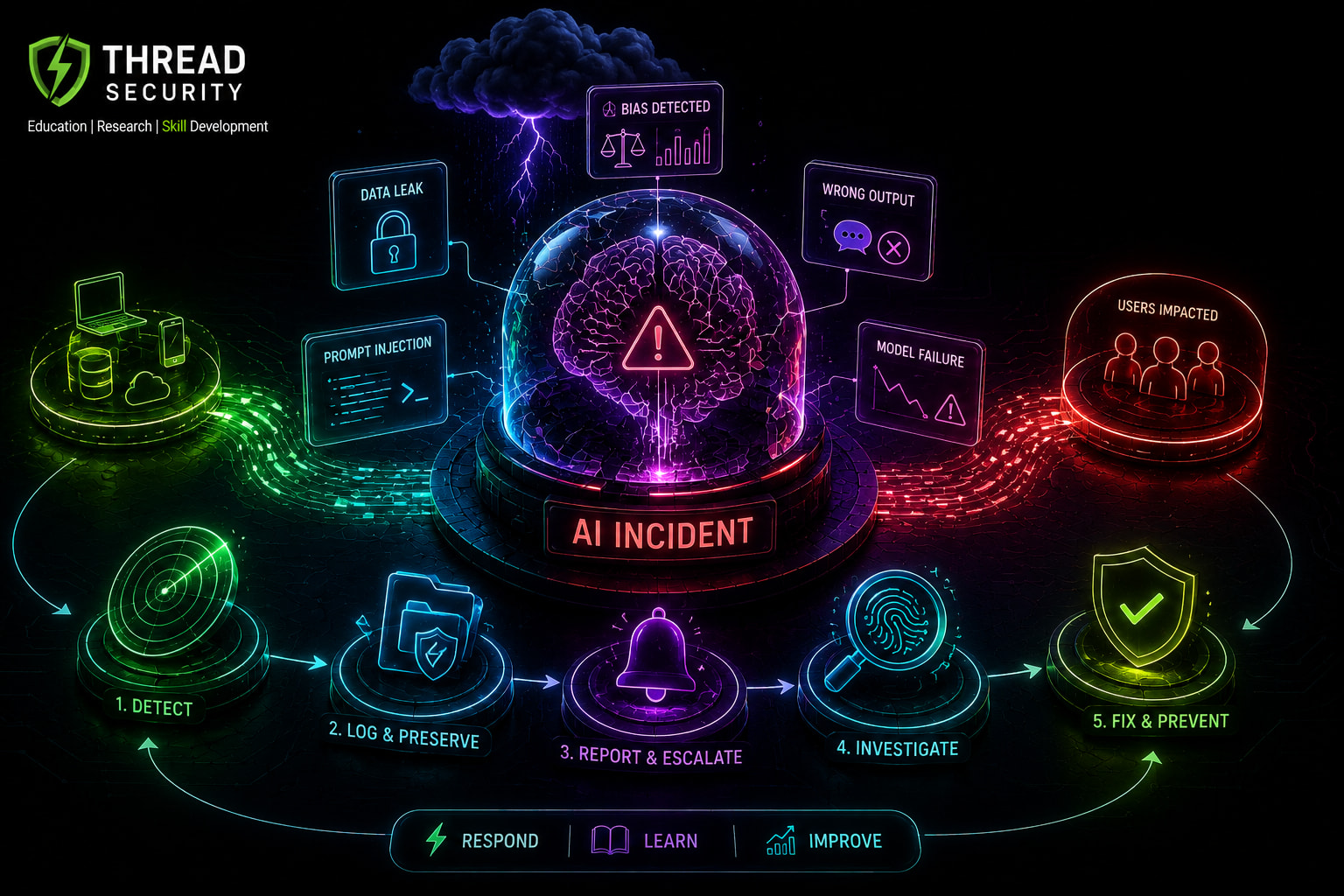
An AI incident is not limited to a system crashing or becoming unavailable. It can involve an AI system causing or contributing to harm, or creating a situation that requires investigation and intervention.
Examples include:
Incorrect or misleading outputs: An AI assistant repeatedly provides fabricated information that users may rely on.
Privacy exposure: A system reveals personal or confidential information to an unauthorized user.
Security manipulation: Prompt injection or another attack causes an AI application to ignore intended restrictions or misuse connected tools.
Biased behavior: A model produces systematically different outcomes for certain user groups.
Operational failure: A model update causes a sudden increase in errors, delays or failed transactions.
Failure to detect: An AI monitoring system misses an event it was expected to identify.
Misuse or overreliance: Users depend on AI-generated recommendations without appropriate verification or oversight.
It is also useful to distinguish an actual incident from an AI hazard. The OECD's 2024 terminology paper describes an AI incident in terms of actual harm, while an AI hazard concerns a situation that could plausibly lead to harm. A near miss may therefore deserve investigation even if no one has been harmed yet.
This distinction matters because organizations should not wait for visible damage before investigating a serious warning sign.
2. Common Categories of AI Incidents
Classifying an incident helps teams identify the right investigators and response actions. One incident can belong to multiple categories.
Incident Category | Example | Possible Response |
|---|---|---|
Model or output failure | Incorrect, fabricated or inconsistent responses | Review outputs, model version and evaluation results |
Data and privacy incident | Personal information appears in an unauthorized response | Restrict exposure, preserve evidence and notify privacy stakeholders |
Security incident | Prompt injection manipulates an AI agent into an unsafe action | Contain affected tools, access and integrations |
Bias or fairness issue | Some groups receive consistently poorer outcomes | Investigate affected groups, data and evaluation methods |
Availability or performance failure | AI service becomes unavailable or excessively slow | Restore service and investigate deployment or infrastructure changes |
Human or operational error | An operator uses an AI recommendation without required review | Review procedures, training and oversight controls |
The OECD's 2025 Common Reporting Framework for AI Incidents offers a broader way to describe an AI system's involvement. It considers whether the system was a direct cause, a contributing factor, failed to act, or was involved through overreliance, misuse or human error. This is useful because not every AI-related incident is caused by a defective model.
3. What Should an AI Incident Report Contain?
The first step after detecting a possible incident is to create a clear record. Teams should avoid relying on informal chat messages or someone's memory of what happened.
A useful incident report should capture the following information:
A. Incident Identification
Unique incident ID.
Date and time of detection, including time zone.
Name of the affected AI application or service.
Person or monitoring system that detected the issue.
Current incident status.
B. System and Technical Details
Model name, provider and version.
Application release or deployment version.
Relevant configuration and prompt versions.
Input and output samples, with sensitive information protected.
Relevant logs, error messages and system events.
Connected APIs, tools, databases or external services involved.
C. Impact and Scope
What went wrong?
How many users or records may be affected?
Did the incident involve financial, privacy, security or operational harm?
Is the problem continuing?
Are there signs of unauthorized access or misuse?
D. Response Information
Immediate actions taken.
People and teams notified.
Containment and recovery measures.
Evidence preserved.
Current findings and unresolved questions.
Assigned owner and next review time.
Important: Logging does not mean collecting every piece of user information. Logs should follow access-control, retention and data minimization requirements. Sensitive prompts, personal information, credentials and confidential documents should not be copied into unrestricted incident records.
4. Who Should Be Notified When an AI System Fails?
Not every incident needs to be reported to every department. The notification process should depend on severity, affected users and the type of harm involved.
Stakeholder | When to Involve Them |
|---|---|
Incident response lead | When an issue requires coordinated investigation and response |
AI or ML engineering team | When model behavior, data, evaluation or deployment may be involved |
Security team | When there is suspected manipulation, unauthorized access or system compromise |
Privacy or legal team | When personal data, confidentiality or legal obligations may be affected |
Product or business owner | When product functionality, customers or business operations are affected |
Management | When impact, severity or business continuity requires leadership decisions |
Affected users or customers | When communication, warnings, support or corrective action is necessary |
Organizations should define notification thresholds before an incident occurs. A minor display error may require a product-team ticket, while an AI system exposing confidential information may require immediate escalation to security, privacy and management teams.
External reporting obligations depend on the organization, sector, location, applicable law and type of incident. An internal incident report does not automatically satisfy a legal or regulatory notification requirement. Legal and compliance teams should determine whether external authorities, regulators, customers or other parties must be notified and within what timeframe.
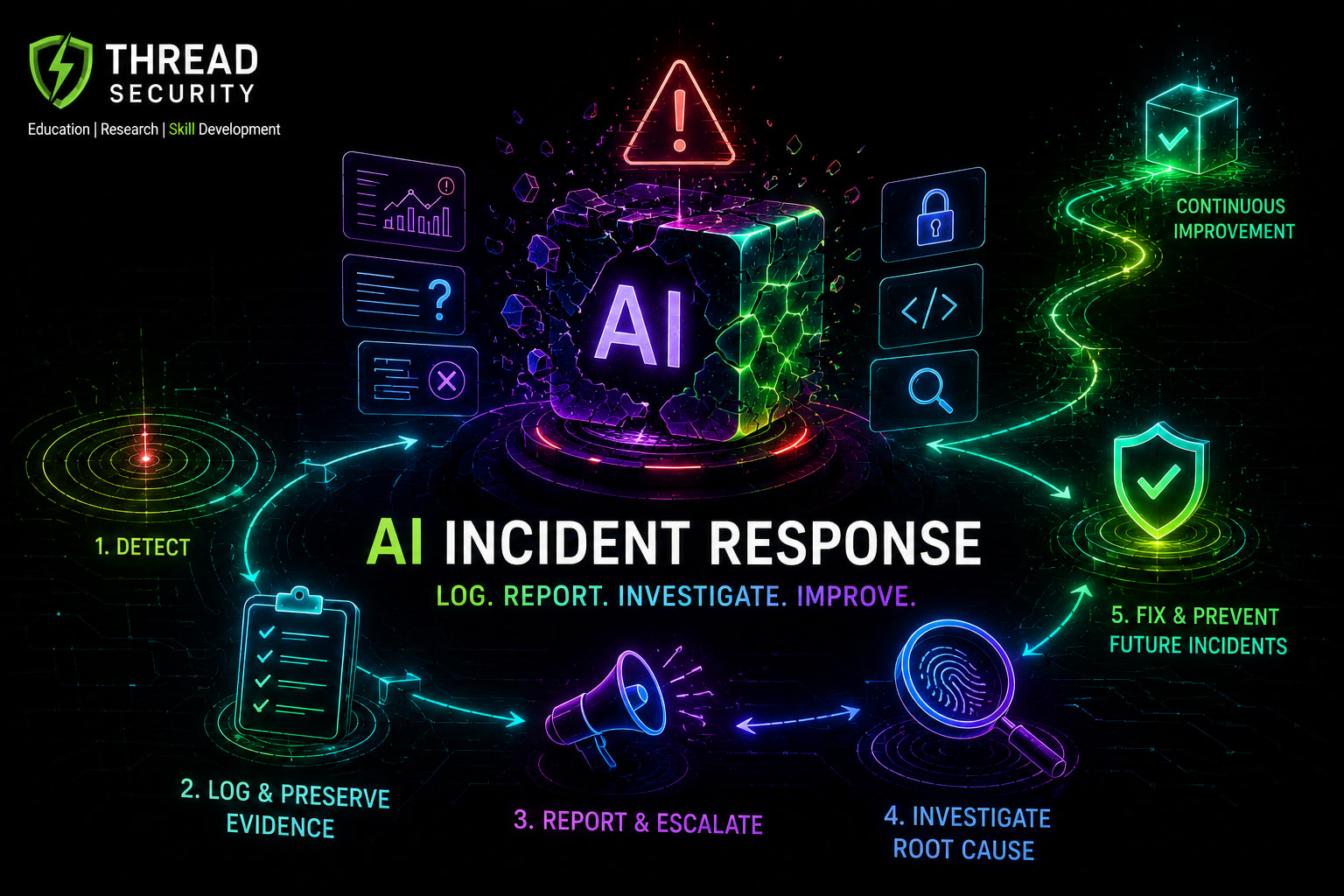
5. The AI Incident Response Timeline
Once an issue is detected, the response should follow a structured sequence. The exact actions and timing will depend on the severity of the incident.
Detection: Identify unusual behavior through user reports, monitoring alerts, security tools or internal testing.
Initial recording: Create an incident ID and capture the first available evidence, timestamps and affected system details.
Triage: Assess severity, potential harm, affected users and whether the issue is still active.
Escalation: Notify the appropriate incident owner, technical team, security team and other relevant stakeholders.
Containment: Limit the impact. This may involve disabling a feature, restricting tool access, rolling back a model or routing requests to a human.
Investigation: Analyze logs, versions, data, inputs, outputs and recent changes to determine what happened.
Recovery: Apply a verified fix, test the system and restore service under controlled conditions.
Post-incident review: Document root causes, lessons, corrective actions and owners.
Teams should not rush to restore a system simply to reduce downtime. If the underlying issue is not understood or the fix has not been tested, bringing the system back online may create another incident.
6. Fictional Case Study: When a Customer Support AI Gives the Wrong Answer
Consider a fictional online service company called ShopEase. It uses an AI customer support assistant to answer questions about refunds, delivery and order status.
One morning, customers begin reporting that the assistant is incorrectly telling them that certain refund requests are not eligible. The actual company policy allows those refunds under specific conditions.
What Happened?
The support team notices an increase in complaints. An initial investigation finds that the assistant is retrieving an outdated refund policy document instead of the latest approved version.
Example Incident Timeline
Time | Event |
|---|---|
09:10 | First customer complaint is received. |
09:25 | Support team identifies similar complaints from other customers. |
09:40 | Incident is recorded and assigned to the product team. |
10:00 | AI engineering and support teams are notified. |
10:20 | Automated refund-policy answers are temporarily disabled. |
11:15 | Investigation identifies an outdated document in the retrieval system. |
12:30 | Updated document is indexed and tested against sample questions. |
14:00 | Feature is restored with additional monitoring. |
This is an illustrative timeline, not a recommended response-time guarantee.
What Should Be Logged?
Incident ID and detection time.
AI assistant and model version.
Retrieval system and document version.
Examples of incorrect answers, appropriately redacted.
Number of affected conversations, where known.
Customer complaints and support-team observations.
Actions taken to disable and restore the feature.
Results of testing after the correction.
Root Cause
The investigation finds that the refund policy was updated in the company's document repository, but the retrieval system continued using an older indexed version. The AI model was generating answers based on information it had received from the retrieval component.
This means the visible problem was an incorrect AI answer, but the underlying issue was a failure in document synchronization and version management.
Corrective Actions
Update and re-index the approved policy document.
Introduce document version checks.
Test retrieval results whenever policy documents change.
Add monitoring for outdated or missing knowledge sources.
Provide a human escalation option for uncertain refund questions.
Review whether customers who received incorrect answers need direct communication or corrective support.
The lesson is simple: correcting the model's response alone would not solve this incident. The team had to fix the information pipeline and improve the process for updating knowledge sources.
7. Root-Cause Analysis: Do Not Stop at the First Explanation
Root-cause analysis helps teams understand why an incident occurred instead of treating only its visible symptoms.
One simple technique is the Five Whys. The team repeatedly asks why a problem occurred until it identifies an actionable underlying cause.
For the ShopEase example:
Why did the assistant give an incorrect refund answer? It used outdated policy information.
Why was outdated information available? The retrieval system had not indexed the latest document.
Why was the document not indexed? The update process did not trigger a successful re-indexing operation.
Why was the failed update not detected? There was no monitoring alert for document-version mismatch.
Why was this monitoring missing? The deployment checklist did not include knowledge-source freshness checks.
The final finding is not simply that the AI gave a wrong answer. The team lacked a reliable process for updating and validating the information used by the AI system.
A good review should distinguish confirmed facts from assumptions, record contributing factors and assign corrective actions. Avoid blaming an individual without examining the process, technical controls and organizational decisions that contributed to the failure.
8. How Should Users Be Informed?
Communication is an important part of incident response. Users should receive information that is accurate, relevant and appropriate to the impact.
A useful user communication should explain:
What happened, in language the user can understand.
Which service or feature was affected.
Whether the user's information or activity may have been affected.
What the organization has done to contain the problem.
Whether users need to take any action.
Where users can ask questions or request support.
For example, ShopEase could communicate that its support assistant temporarily provided outdated refund-policy information, that the affected feature was disabled while the issue was investigated, and that customers can contact the support team for verification.
Organizations should avoid claiming that an incident is fully resolved until the relevant checks have been completed. They should also avoid making unsupported statements about the number of affected users or the absence of data exposure.
9. Recognized Frameworks for AI Incident Response
There is no single framework that covers every technical, operational, security and social aspect of an AI incident. However, several recognized references can help organizations build a more structured process.
A. NIST AI Risk Management Framework (AI RMF 1.0)
The NIST AI RMF organizes AI risk management around four functions:
GOVERN: Establish responsibilities, policies and accountability.
MAP: Understand the AI system's context, intended use and potential impacts.
MEASURE: Assess and monitor risks, performance and trustworthiness.
MANAGE: Prioritize risks and plan responses, recovery, communication and continuous improvement.
The MANAGE function is especially relevant after an AI failure. NIST describes the importance of documented response and recovery plans, post-deployment monitoring, incident communication and continual improvement.
B. NIST SP 800-61 Revision 3
NIST SP 800-61 Rev. 3, finalized in April 2025, provides recommendations for integrating cybersecurity incident response into broader cybersecurity risk management under the NIST Cybersecurity Framework 2.0.
It is particularly useful when an AI incident involves security threats such as unauthorized access, data exposure, compromised integrations or malicious manipulation. It should not be treated as an AI-specific taxonomy or a complete replacement for AI risk assessment.
C. OECD Common Reporting Framework for AI Incidents
The OECD's 2025 framework provides a common approach to describing and reporting AI incidents. It includes 29 criteria intended to help stakeholders understand incidents across different sectors and jurisdictions.
It is useful when an organization wants consistent incident records, clearer descriptions of an AI system's involvement and a better understanding of the impact on affected stakeholders.
These references complement one another: NIST AI RMF supports AI risk management, NIST SP 800-61 Rev. 3 supports cybersecurity incident response, and the OECD framework supports structured AI incident reporting.
10. Practical Checklist: What Should Your Team Do?
Use this checklist as a starting point when designing an internal AI incident response procedure.
Define what counts as an AI incident and a near miss.
Assign an incident owner and escalation contacts.
Maintain an inventory of deployed AI systems and their dependencies.
Record model, application, prompt and data-source versions.
Protect logs and evidence from unauthorized access or alteration.
Define severity levels and escalation criteria.
Prepare containment and fallback procedures.
Define how users and affected stakeholders will be informed.
Review incidents and assign corrective actions.
Test whether fixes actually prevent the same failure from recurring.
A checklist is useful, but it is not a substitute for an incident response plan that has been tested against realistic scenarios.
11. A Practical Learning Exercise: Create an AI Incident Report
Understanding incident response becomes easier when you practice documenting a failure.
Your challenge: Imagine that an AI-powered college admission assistant starts showing one student's application status to another student. The college discovers the problem after receiving a complaint.
Prepare a short AI incident report containing:
Incident summary: Describe what happened in three to five sentences.
Incident category: Identify whether it involves privacy, security, model behavior or more than one category.
Timeline: Record detection, escalation, containment, investigation and recovery events.
Evidence: List the logs, access records, application versions and other information that should be preserved.
Stakeholders: Identify who must be notified and explain why.
Containment: Recommend immediate steps to stop further exposure.
Root cause: Suggest possible technical or operational causes that need investigation.
Prevention: Recommend at least three long-term improvements.
Expected deliverable: A two-page incident report in PDF or document format, including a timeline and corrective-action table.
Evaluation criteria: Accuracy of incident classification, quality of evidence identification, sensible escalation, practical containment steps and clear corrective actions.
Important: Do not include real student names, application records or personal information in the exercise. Use fictional data only.
Frequently Asked Questions
1. What is AI incident response?
AI incident response is the structured process of detecting, documenting, investigating, containing and recovering from failures or harmful events involving AI systems.
2. Is every incorrect AI answer an incident?
Not necessarily. A single incorrect answer may be a normal quality issue, a near miss or part of a larger incident. Its classification depends on context, expected behavior, scale and potential or actual harm.
3. What information should be logged during an AI incident?
Teams should record timestamps, system and model versions, relevant inputs and outputs, error messages, affected components, impact, actions taken and investigation findings. Sensitive information must be protected.
4. Who is responsible for handling an AI incident?
Responsibility depends on the organization's structure and the type of incident. Incident response leads, AI engineers, security teams, privacy specialists, product owners and management may all be involved.
5. Which frameworks can help with AI incident response?
NIST AI RMF 1.0 supports AI risk management, NIST SP 800-61 Rev. 3 supports cybersecurity incident response, and the OECD Common Reporting Framework for AI Incidents supports structured AI incident reporting.
6. Why is root-cause analysis important?
It helps identify the underlying technical, data, process or human factors that contributed to a failure. Without it, teams may correct the visible symptom while leaving the original weakness in place.
Key Takeaways
AI failures can involve incorrect outputs, privacy exposure, security manipulation, bias and operational problems.
Incident records should capture technical details, timelines, impact and response actions.
Escalation should involve the stakeholders relevant to the incident's severity and type.
Containment should come before uncontrolled restoration of service.
Root-cause analysis should investigate systems and processes, not just visible errors.
User communication should be accurate and appropriate to the impact.
Recognized frameworks provide useful guidance, but organizations must adapt their procedures to their own systems and obligations.
Conclusion: Treat Every AI Failure as a Learning Opportunity
AI systems are not immune to failures, and deploying a model does not remove an organization's responsibility for what happens when people use it. A reliable AI incident response process helps teams understand failures, protect affected users, restore services safely and prevent recurring problems.
The most important lesson is that an incident should not end when the application starts working again. Teams must preserve evidence, communicate responsibly, investigate the underlying causes and verify that corrective actions are effective.
For students and professionals exploring AI security and risk management, learning how to respond to AI failures is an important part of understanding responsible AI deployment.
Explore practical AI and cybersecurity learning with Thread Security Education. Build your understanding of AI systems, security practices and real-world technology challenges through practical, industry-oriented learning.
Learn more: Thread Security
Simranjit Kaur
VERIFIEDAI Trainer · Thread Security
Faculty mentor & research guide at Thread Security Education.