You're already using AI, right?
Most professionals do not have “AI” in their job title, and most are still using it. Microsoft and LinkedIn’s 2024 Work Trend Index found that 92 percent of Indian knowledge workers surveyed used AI at work, against 75 percent globally, and that 72 percent of Indian AI users were bringing their own AI tools to work. The same research reports that 80 percent of Indian business leaders would prefer a less experienced candidate with AI skills over a more experienced one without.
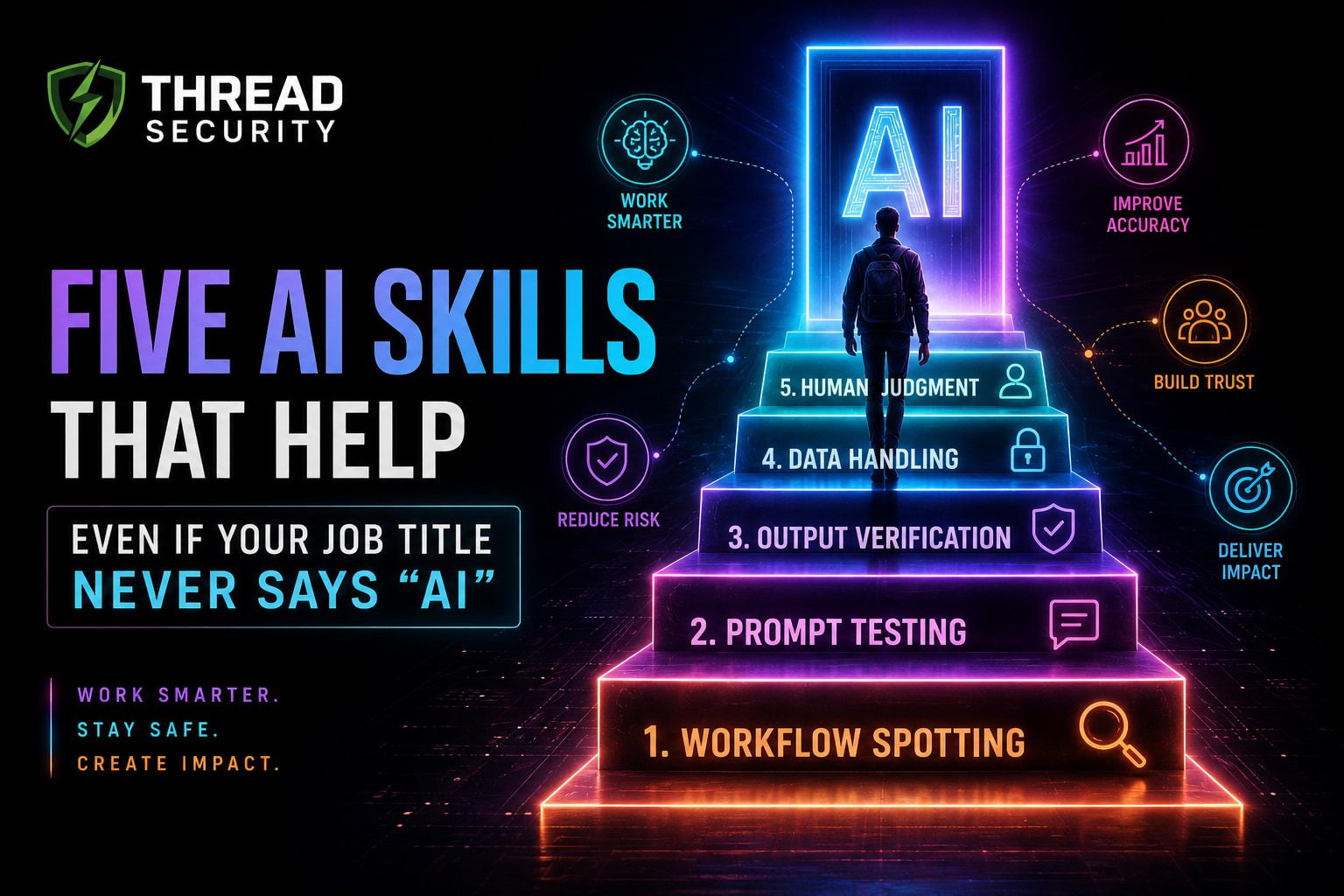
Treat these figures with care. They come from a 2024 survey by a vendor with a stake in AI adoption, and “used AI” covers everything from one-off experiments to daily reliance. But the direction is clear. The valuable AI skills for professionals are not about building models. They are habits that make ordinary office work faster, safer and more accurate. Here are five, each with a realistic example.
Why These Five Skills
The creation of a chatbot is open to anyone. The difference is between "as a toy" and "as a tool. Casual use produces a draft you cannot trust and a habit your company cannot see. Reliable use will be selecting suitable tasks, testing instructions, checking results, safeguarding data and documenting the process that others can follow. The dangers of not doing this are a reality. According to IBM's 2025 India research, just 37 percent of organizations have controls to access AI, and non-authorized "shadow AI" contributes approximately ₹1.79 crore to the average cost of a breach.
Skill 1: Workflow Spotting
The first skill is knowing what tasks to give AI to do. Good candidates are frequent, repetitive, text-heavy, low-risk and easy to check. Poor candidates encompass decisions of high consequence, sensitive information or consequences of decisions that impact an individual's pay, health or legal status.
Office example: HR Coordinator writes repetitive confirmation emails for interviews, sets up rejection emails, etc. six hours per week. It's a good guess: repetitive, formulaic, and easy to read through. Another is an accounts executive who compares the descriptions of items in the invoices to the purchase orders. Who to hire or not hire or whether or not to pay an invoice that is disputed is not.
The exercise: Make a list of all tasks that are repeated over a week. Mark each on a scale of 1-5 on frequency, repetition, risk of error and checking. Keep the lower hanging fruit of high frequency, low-risk, easily checked ones first. Map the steps first, you don't want to automate a disorganized process if you're going to create the mess on the computer too.
Skill 2: Prompt Testing
An instruction is an instruction and instructions must be tested like any other process. Many people write one, get one good and just assume it will work 100% every time. It will not. Reliable prompt use involves using your prompt with a number of actual examples, some awkward, and making comparisons.
AI use case: In an office setting, a sales operations analyst desires AI to summarize long threads of emails from customers to feed into the CRM in 3 lines. The prompt is effective when tested on one thread that is tidy. It creates an arbitrary 'deadline' on a cluttered thread containing forwarded messages, with a signature block. The analyst tests the rule on 10 real threads and writes the rules: Use only facts stated in the thread. If something is unclear, write 'unclear.'.
How to practice: Write your prompt with a clear role, context, task, format and limits. Try it with five to ten actual inputs, such as two challenging ones. Score each output, make one change at a time and keep the best one, with a date. Maintain a common prompt library for your group.
Skill 3: Output Verification
AI-generated content has a confident tone, no matter whether it's accurate or not. The practice of checking before relying on or sending something is verification. The most publicized case is Mata v. Avianca, a case in which two New York attorneys submitted a brief with six fake court opinions written by ChatGPT and got fined $5,000 in June of 2023. One lawyer subsequently claimed he had asked the chatbot if the cases were true and it responded with "yes. The lesson is that you can't test an AI with an AI. An independent source is required.
Industrial use case: An engineer employs AI to streamline the review of a 40-page vendor contract. Industrial use case: A finance analyst uses AI to succinctly summarize a 40-page vendor contract. The summary indicates that the terms of payment are '45 days'. Actually, the contract states that most invoices will have a 30 day payment period, and only one category will have payment requirements of 45 days. It is caught by a two minute check of the original clause.
The way to practice: Line up with the stakes. Re-calculate numbers, recheck names, dates and quotes as per source, open every link and identify the source of the claim. A spot check of the 3 facts is sufficient for low stakes drafts.
Skill 4: Data Handling
Any content copied into an AI application constitutes a disclosure. The way to handle data is knowing what data to share, what tools to use, and how to get rid of what not to share. A simple classification is sufficient: public, internal, confidential and personal data. Customer personal information, credentials, financials before release, contracts should NOT be entered into tools that are not approved by your company.
Such As: HR assistant copies and pastes a candidate's entire resume, including their phone number and ID information, into a free AI tool to reformat the resume. The same could be achieved by masking the identifiers, or in the company's approved tool. For businesses it's legal too. The DPDP Act applies to processing of personal data by a data fiduciary on its behalf and it is the responsibility of the data fiduciary to ensure compliance with the Act. The Rules, notified in November 2025, enter into force in a phased manner within 18 months, roughly 13 May 2027, according to several summaries.
How to practice: Create a single sheet of paper, divided into three columns: "fine to share", "mask first" and "never share". Check with IT or your manager to see which AI tools are allowed, and the time limits. If it doesn't have a policy, request one.
Skill 5: Documenting Automation
The simplest skill saves the most trouble! The greatest danger of an AI-assisted workflow is that no one understands it, so the day you leave it will be vulnerable.
Operations analyst example: An operations analyst creates a weekly sales report using AI to write a comment. It will last for 4 months. Then she rotates teams, the data source changes and no one knows the commentary began to get numbers wrong.
How to practice: Make a 1 page runbook for any automation you create. Include:
What it is and why it is there
The student identifies the input, output, and tool and/or model for the problem.
The prompt should be followed by a version number and date. The prompt should be followed by a version number and date.
Who is responsible for it and who checks the work it produces?
What checks are carried out prior to the use of results
What it is known to contain and what data it should never contain
How to turn it off
Similar concept to model cards and datasheets in responsible AI applications, but at an office level.
A 30-day plan to build all five. A plan to build all five in 30 days
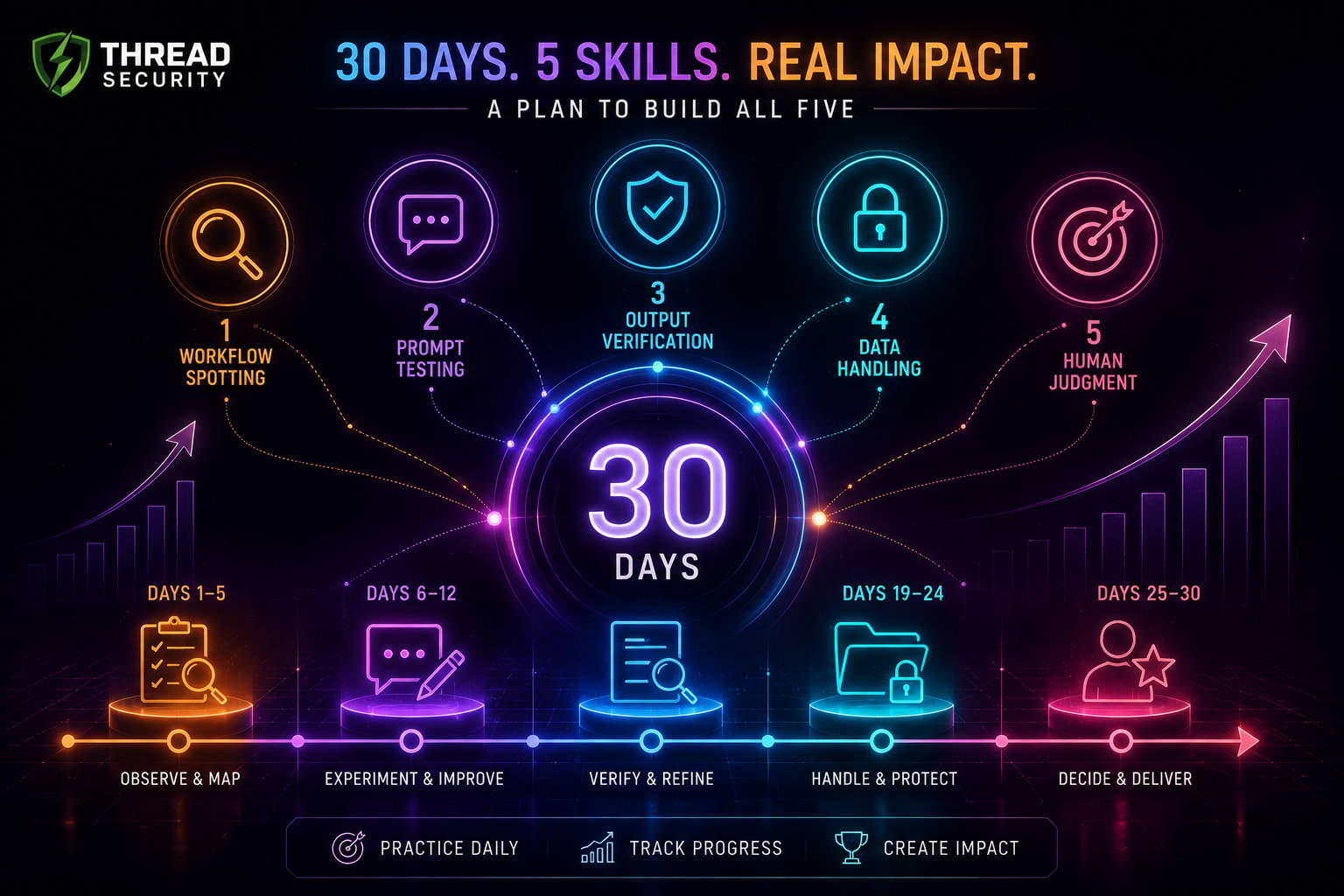
Week 1: Track your repeated tasks and pick one low-risk workflow.
Week 2: Create a prompt and validate it with 10 authentic instances.
Week 3: Create a verification checklist and write your Data Sharing list.
Week 4: Create a one page run book for the workflow and present it to a colleague
The completed runbook together with the before and after time measurements - is an excellent addition to a performance review or CV. Don't just say you have some "AI expertise" when you actually mean "cut weekly reporting from 3 hours to 1 hour" or "Checked twice a week to see if there was any activity on the POWr website.
The Most Common Errors to Avoid
Implementing/using an inefficient process. Trusting fluent output even if it is not checked. Copying and pasting sensitive information into unauthorized applications. Constructing without a responsible party and documentation. Trying to keep up with all of the new tools rather than mastering one process. But treating AI skills as the exclusive domain of the technical team, when those who work on the front line with clients often see the most promising applications.
For Organizations: Where Thread Security Fits
Companies take the risk when employees create their own AI workflow because their data is transmitted via unapproved tools, automations are linked to their internal systems, and prompts can be set to be manipulated. Thread Security is certified as an offensive security firm and penetration testing company, noted services are VAPT, Web Application Penetration Testing, Cloud Security Review, and Smart Contract Auditing. The tests address the APIs, cloud permissions and web apps through which AI workflows are integrated. Based on the average of the sample, Offensive security testing is the biggest cost cutters, saving around ₹2.47 crore per breach, according to the 2026 India report by IBM. If your teams are jumping on AI, make sure to ask any provider, like Thread Security, if testing of AI based workflows is in scope.
AI Courses in Jalandhar will help you go deeper.
When it comes to structured training, consider an AI course in Jalandhar that provides hands-on experience as well as theory classes. There are programs available with offline classes as well as live online batches at Thread Security Education. Its website states that they have three programs: Foundational AI (which starts with Python, and then gets into data analysis, machine learning, FastAPI, SQL and AI deployment); Generative AI and Agentic AI (which they describe as 6-month fellowships); and AI Security and Responsible AI Engineering. The courses in cyber security, such as CEH and industrial training, plus Blue Team and SOC operations, are tailored for professionals seeking to safeguard workflows that leverage AI. Some tracks are available in a shorter format, as shorter 3-month and 45-day versions, on the website, so inquire about which is better suited to a working professional's schedule. These are technical programmes and non-technical persons should first enquire about the prerequisites for these programmes.
Contact: Thread Security Pvt Ltd, 3rd Floor, Vasal Mall, Opposite Hotel President, Police Line, Jalandhar, Punjab 144001. Phone: +91 7347398956.Mon-Sat: 9AM to 7PM.
Frequently Asked Questions
What are the most useful skills for professionals with AI? Identifying workflows that are appropriate for AI, testing prompts, evaluating results, managing data securely, and documenting automated tasks. They are relevant to careers across all areas, including HR, Finance, Sales, Operations, and more.
Is coding essential to work with AI? Not for these 5 skills. If you wish to create your own tools, coding is useful, but if you are using tools you need to use them carefully, test them and use good habits, rather than coding.
Can one copy and paste work documents into an AI tool? Only when the tool has been authorized by your company, and its data conditions are allowed. Do not post personal data, credentials or confidential material onto any other tools not approved by your IT team and request a policy.
What can I do so AI does not make stuff up? It can't be prevented entirely, so check. Verify numbers and facts with the source, instruct the tool to only use information you give it, and never let the same AI verify its own answers.
Key Takeaways
Professionals' top AI skills are habits, like identifying workflows, testing prompts, reviewing results, treating data with care and documenting creations.
Correct output is fluent output! The Mata vs Avianca case is a case in point of lack of verification.
Always consider each paste to an AI tool as a disclosure of data, and use approved tools.
Your best evidence of skill is a runbook of one page that has real before/after numbers.
Call to Action
Select a repetitive chore this week and follow the 30 day plan. Discuss the runbook with another staff member. If your organization is interested in having workflows with AI power tested, check out Thread Security Pvt Ltd. For AI Skill Development in Jalandhar, check out Thread Security Education.
Simranjit Kaur
VERIFIEDAI Trainer · Thread Security
Faculty mentor & research guide at Thread Security Education.